Backlight Bleed vs IPS Glow
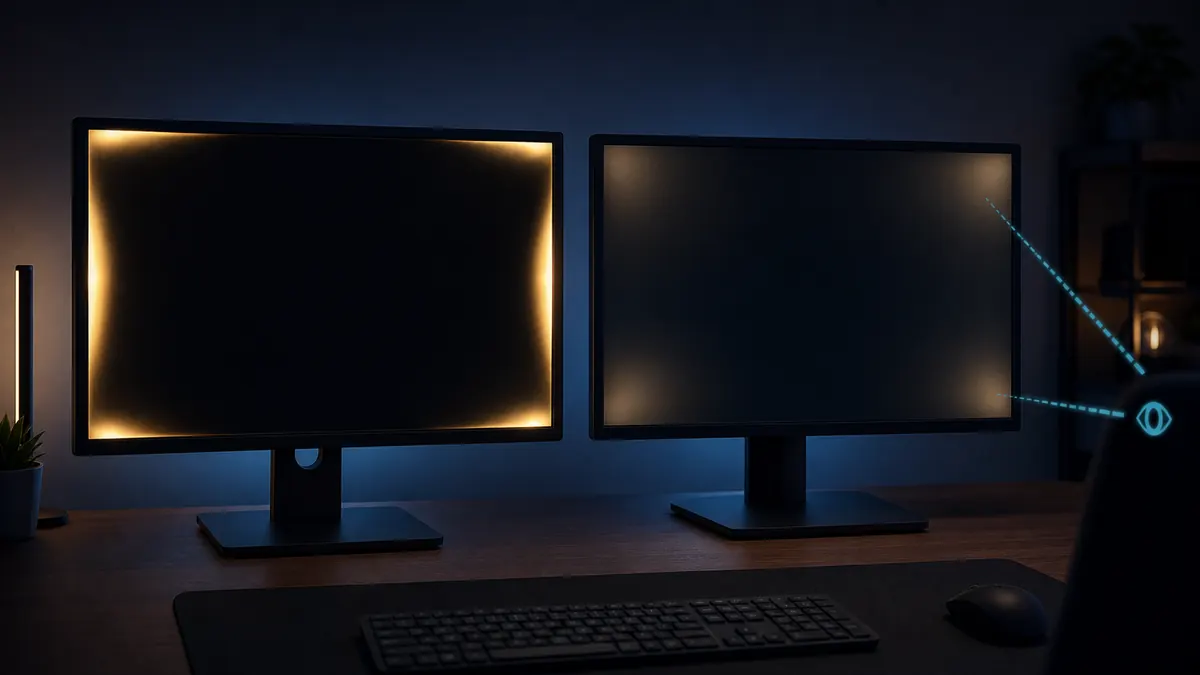
Backlight bleed and IPS glow both appear on dark screens, but they behave differently. Bleed is usually fixed in place, while IPS glow changes with viewing angle, seating position, brightness, and camera exposure.
Quick answer
- Backlight bleed tends to stay in the same edge or corner area when you move your head.
- IPS glow usually shifts, grows, or fades as viewing angle changes, especially on dark screens.
- Phone photos often exaggerate both because the camera raises exposure on black screens.
- Judge severity with normal brightness, normal seating distance, and real dark content, not only a black test pattern.
Set up the black screen test correctly
Open a black fullscreen pattern, dim harsh reflections, and set brightness to the level you actually use for dark content. If you test only at maximum brightness in a pitch-black room, almost any LCD can look worse than it feels in daily use.
- Use your normal seating distance.
- Keep browser UI out of fullscreen.
- Compare with real dark video or game scenes.
The black screen test is a diagnostic tool, not the only judgment.
Identify fixed backlight bleed
Backlight bleed often appears as brighter patches near the edge, corner, or bezel pressure points. The key sign is that the patch remains in roughly the same place as you move your head slightly left, right, up, or down.
- Look for fixed edge leakage.
- Check whether the shape stays in place.
- Retest after lowering brightness to normal use.
Fixed bright patches are more likely to be bleed than angle-dependent glow.
Identify angle-dependent IPS glow
IPS glow is a viewing-angle behavior common to IPS-type LCD panels. It often appears as a broad soft haze, especially in corners, and it can shift or fade when your head position changes.
- Test from your normal seat.
- Move slightly left and right.
- Do not judge only from a phone photo.
If the glow changes with your head position, viewing angle is a major part of the issue.
Understand why photos look worse
Phone cameras often lift exposure when pointed at a black screen. They may also add noise reduction, HDR processing, and off-axis angle distortion. Photos are useful for records, but they should not replace what you see from your normal seat.
- Use manual exposure if you need evidence.
- Keep the camera centered and level.
- Include normal brightness context when sharing photos.
A dramatic photo can overstate a problem that is mild to your eyes.
Judge severity with real scenes
A black screen makes problems visible, but you usually watch movies, play games, or work with mixed content. Test a dark movie scene, a dark game area, and a normal desktop at your usual brightness before making a return decision.
- Check letterbox bars and dark corners.
- Look for distraction, not just existence.
- Compare day and evening room lighting.
The issue matters most when it distracts you in the content you bought the monitor for.
Reduce visibility before deciding
You cannot always eliminate bleed or IPS glow, but you can reduce perceived severity. Lower brightness, add soft bias lighting behind the monitor, sit centered, and avoid extreme off-axis positions. If the problem remains distracting, then compare your unit with return or exchange rules.
- Lower brightness to a comfortable level.
- Use bias lighting in dark rooms.
- Keep your eyes centered with the panel.
Mitigation helps perception, but it does not change a genuinely poor panel sample.
Decision table
Backlight bleed vs IPS glow quick comparison
The easiest practical test is movement. Fixed patches suggest bleed; angle-dependent haze suggests IPS glow.
| Behavior | Backlight bleed | IPS glow |
|---|---|---|
| Position | Usually fixed near edges or corners. | Often changes as your viewing angle changes. |
| Shape | Sharper leakage, bright patches, or edge pressure marks. | Broad soft glow, often in corners. |
| Photo behavior | Can be exaggerated by exposure but stays in the same place. | Can look much worse off-axis or through a camera. |
| Settings impact | Lower brightness can reduce visibility but not the physical leakage. | Brightness, seating position, and room light strongly affect perception. |
| Decision point | Return if fixed patches distract in real content and policy allows. | Return only if normal-use glow is unacceptable for your use case. |
Recommended tools
Run the tests mentioned in this guide
Backlight Bleed Test
A dark room and a full black screen make edge leakage, cloudy corners, and panel glow easier to judge.
Black Screen
A fullscreen black screen helps reveal bright stuck pixels, light leakage, OLED behavior, and dark-room panel glow.
Screen Uniformity Test
Uniformity patterns help you see whether brightness and color remain consistent from center to corners.
Brightness Test
The brightness test helps you set a comfortable level while keeping near-black and near-white detail visible.
FAQ
Common questions
Is IPS glow a defect?
Usually it is a panel characteristic, not necessarily a defect. Severity and return policy depend on the unit and seller.
Why do photos make bleed look worse?
Phone cameras often overexpose black screens, making normal glow look extreme.
Can settings reduce glow?
Lower brightness and better room lighting can reduce perceived glow, but physical panel behavior remains.
Can backlight bleed get better over time?
Small pressure-related changes can shift slightly after setup, but do not rely on time to fix a distracting fixed bright patch.
Should I test in a completely dark room?
A dark room reveals issues clearly, but also exaggerates normal LCD limitations. Test there, then retest with the lighting you actually use.
Is OLED affected by IPS glow?
No. IPS glow is an LCD viewing-angle behavior. OLED has different concerns such as near-black uniformity, image retention risk, and brightness limits.
Run the matching fullscreen tests.
Use the guide above to decide what to look for, then confirm it with a clean test pattern.